
One Photo, Both Timelines
The zombie trend ai workflow starts from a single photo. The model keeps the face, hair, and outfit through the cold present-day scene and the warm flashback, which is what makes the cut land.
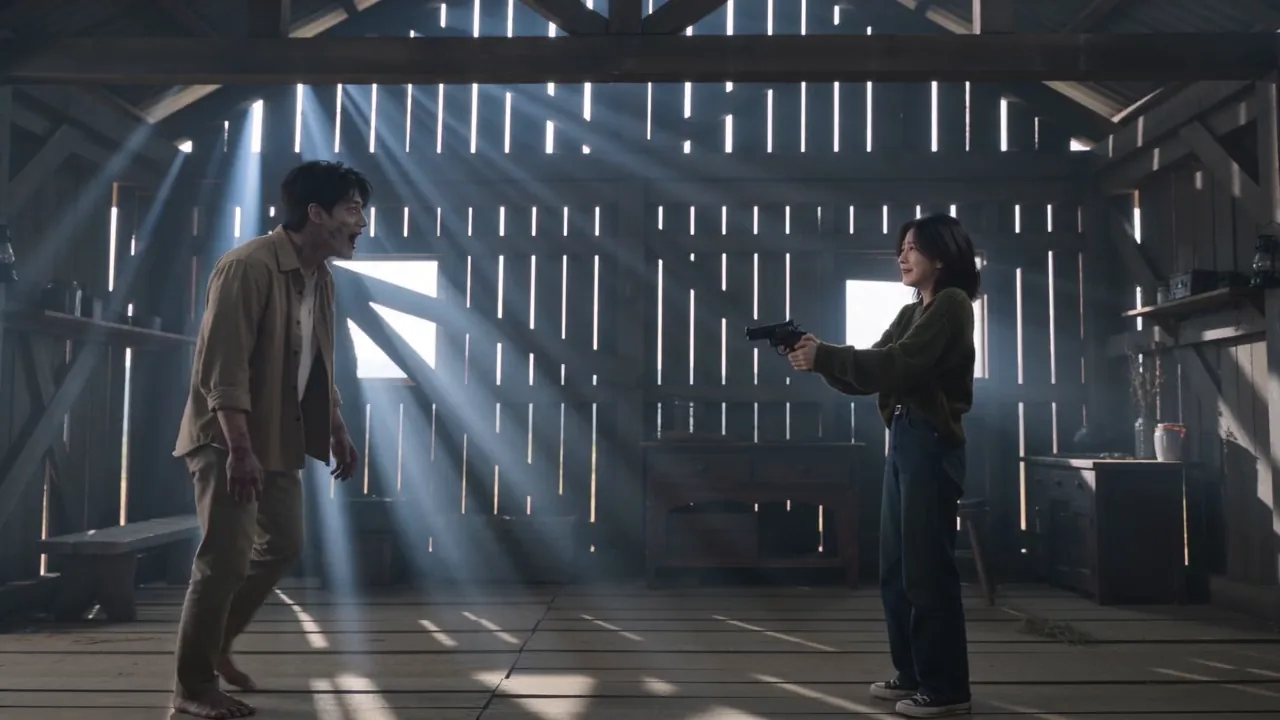

The clip people search as zombie ai love story tren is a 15-second mini film with one twist. A survivor aims a gun at the person they love, who has already turned. They cannot pull the trigger. The gun drops, the arms open, the infected partner rushes in, and at the moment of contact the scene cuts to a warm memory: the same two people laughing in a wheat field, on a beach, or in the snow before anything went wrong. Captions spell it zombie ai love story tren, trnd zombie ai, or trend video zombie ai, but every version follows the same four beats. This zombie trend ai generator exists for the remix step. Upload a photo, keep or edit the preset prompt, pick a model, and the clip comes back with the standoff, the turn, the embrace, and the memory in order. No timeline, no keyframes, and no template to hunt for. If you can describe who turns and where the memory happens, you can make your own version of the zombie trend ai clip tonight.
The zombie trend ai workflow starts from a single photo. The model keeps the face, hair, and outfit through the cold present-day scene and the warm flashback, which is what makes the cut land.
The zombie trend ai preset prompt already carries the standoff, the turn, the embrace, and the memory. You do not have to storyboard a trend video. Zombie AI motion, the lowered gun, and the match cut are described for you.
Move the memory to a beach, a snowy hill, or a kitchen at midnight. The zombie trend ai beats stay fixed while the location and the outfits make it yours.
Pick 9:16 for TikTok and Reels or 16:9 for a wider cinematic look, then add the trending sound in your editor. A trnd zombie ai post usually runs 10 to 15 seconds, and that is exactly what the clip gives you.
Every zombie trend ai clip that goes viral follows the same shot order. Knowing the four beats helps you judge a result in seconds, write a sharper prompt, and spot when a generation drifted. These frames come straight from the example video above.

The format works as a template because the four beats can carry almost any pairing. These are the versions people actually post with the zombie trend ai generator, and what to change in the prompt for each.
The classic zombie ai love story tren: one partner turns, the other cannot shoot. Upload a clear couple photo, name who stays human in the prompt, and keep the memory scene simple.
Owner and dog, cat, or rabbit. The pet is the one who turned, and the memory is a walk, a couch, or a yard. The trnd zombie ai pet edit is the most shared variant after couples.
The embrace reads as loyalty instead of romance. Road-trip memories, a childhood kitchen, or a stadium seat all work. Keep both outfits recognizable so the zombie trend ai cut stays believable.
Swap the barn for a diner, a snowy cabin, a hospital corridor, or a parking garage. The zombie trend ai beats stay fixed; only the backdrop and the lighting change.
Generate in 9:16 so the faces fill the phone screen. That is how almost everyone posts this trend video. Zombie AI output in 16:9 still works for YouTube, but it feels like a film trailer instead of a feed post.
The generator creates the motion; the audio comes from the trend. Drop the clip into TikTok, pick the sound everyone is using for the zombie ai love story tren, and publish with the original caption style.
Short answers about the zombie trend ai generator, the original clip, photos, formats, and what to do when a result drifts.
Looking for more related tutorials? Read the Video AI blog.